
Kaba planning guide
The value of Kaba E-Plex Electronic Locks and Lifecycle Migration depends on how well it matches the facility, users and support plan. The sections below separate product-family facts from site-specific design decisions for commercial projects in North and South Carolina.
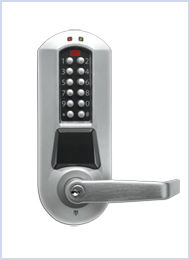
Product capabilities worth comparing
These product-specific topics help a project team ask better questions. Their presence on the page does not mean every component belongs at every site.
- Product and selection guidance
- Inventory E-Plex series, firmware/software and databases
- Discontinued 3000/5000/ACS support and spare strategy
- Current partner-integration lock options where available
- Migration to current dormakaba or compatible access platforms
- Door preparation, life safety and accessibility
- Current availability, subscription and lifecycle support
- Administrator, credential and emergency override policy
- Training, documentation and preventive maintenance
- dormakaba E-Plex lifecycle notice
- dormakaba electronic locks
- Opening type, handing, frame and door condition
- Fire rating, egress, accessibility and code constraints
- Fail-safe or fail-secure operation and emergency release
- Credential, reader and controller compatibility
- Battery, wireless gateway and offline behavior
Decisions to document before procurement
Use these checkpoints to compare proposals on the same basis. Clear answers make lifecycle cost and implementation risk easier to evaluate.
- Survey every controlled opening, frame, door hardware, free-egress requirement and accessibility condition.
- Confirm controller, reader, credential and lock compatibility, including offline operation and battery backup.
- Define who manages identities, schedules, visitors, mobile credentials and revoked access.
- Map fire-alarm, elevator, video, intrusion, directory and property-management integrations before ordering equipment.
Planning for North and South Carolina facilities
Carolina projects can span urban office towers, distribution facilities, campuses and remote sites. The design should account for the building’s operating hours, local construction coordination, environmental exposure and the owner’s support model rather than assuming every location is identical.
360 Mobile Vision coordinates Carolina projects from 6201 Fairview Rd, Charlotte, North Carolina 28210 - USA. Site coverage, scheduling, travel and trade responsibilities are confirmed against the actual scope.
A practical delivery sequence
1. Problem definition
State the event or workflow the system must improve and how success will be measured. The Kaba E-Plex Electronic Locks and Lifecycle Migration scope should identify the evidence produced at this stage.
2. Option review
Compare reuse, migration and replacement using compatibility, lifecycle and implementation risk. The Kaba E-Plex Electronic Locks and Lifecycle Migration scope should identify the evidence produced at this stage.
3. Coordinated deployment
Sequence infrastructure, hardware, software and integrations with the owner and other trades. The Kaba E-Plex Electronic Locks and Lifecycle Migration scope should identify the evidence produced at this stage.
4. Closeout
Resolve punch items and provide credentials, backups, training, test results and support contacts. The Kaba E-Plex Electronic Locks and Lifecycle Migration scope should identify the evidence produced at this stage.
Lifecycle, updates and official resources
Plan replacement and upgrade responsibility as part of the initial scope. Official manufacturer portals are the source for current downloads and advisories; locally mirrored firmware can become outdated or mismatched, so 360 Mobile Vision does not provide it.
Build a site-specific scope
Describe what must improve, who will administer the system and which integrations matter. That information helps determine whether Kaba E-Plex Electronic Locks and Lifecycle Migration is the right direction before a parts list is prepared.
Official Kaba / dormakaba software, firmware and support
Use the manufacturer links below for current software, firmware, release notes, manuals and technical resources. 360 Mobile Vision links directly to official manufacturer portals and does not copy or host firmware files.
Before installing an update: verify the exact model, region, hardware revision, current version, required intermediate releases, licensing or support entitlement, backup and rollback plan, integrations and maintenance window. An incorrect firmware package or upgrade sequence can interrupt service, invalidate compatibility or prevent a downgrade. Coordinate updates for monitored, life-safety-adjacent or business-critical systems with the system administrator and an authorized specialist.
Some resources require a customer, dealer, certified-technician or active-support login. Cloud-managed products may update automatically and may not provide a public firmware file.