

Eagle Eye
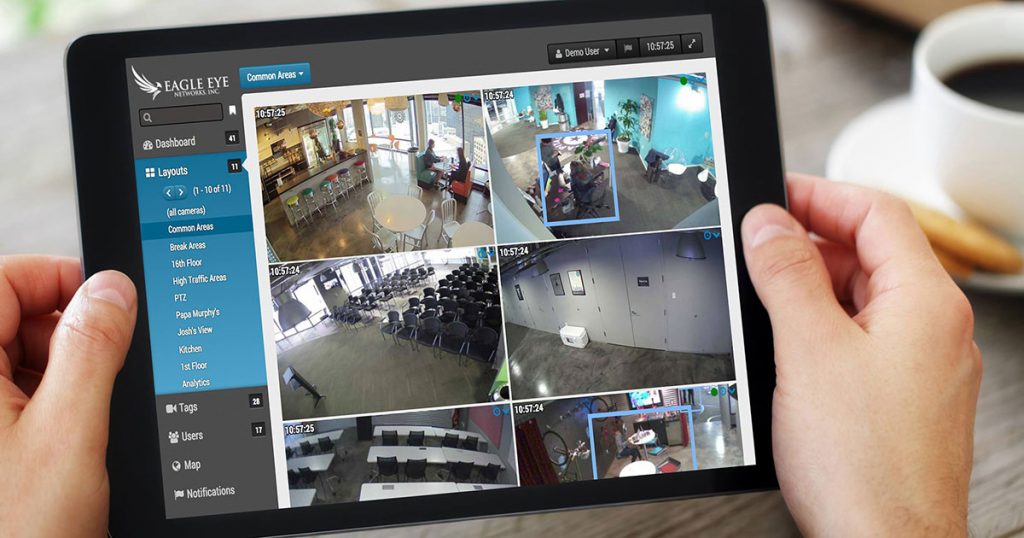
Streamline the cloud security process with Eagle Eye Cloud VMS. Eagle Eye offers cloud-based video surveillance that directly transfers footage from a security system into remote cloud-based storage. Firms utilizing the service can then access their security cams from any location to playback audio and video from a variety of authenticated mobile and remote devices.

Arcules
Seize the benefits of remote access and reduced IT personnel costs with Arcules cloud video storage. Arcules provides a cloud-based security system that offers access to real-time footage from both mobile and web browsers. Such capabilities allow retail businesses to reduce the amount of theft, property management firms to prevent crimes, and professional services to monitor questionable activities.

AWS and Smart Client
Store and organize crucial security data with top-notch management from Amazon S3 surveillance cloud storage. Amazon S3 permits users to store essential data into a data cloud which can be accessed at any time. Users can manipulate large amounts of data at once with S3 batch operations, add other verified members to access control lists, and prevent accidental information loss with multi-factor authentication.

Cloud managed video surveillance, described honestly
A cloud based video surveillance system replaces the recorder in your closet with a subscription. Cameras still hang on walls and still need cable and power, but the recording, the software updates, the remote access and the storage all move off your site. That is the whole idea, and most of what gets written about it oversells the change.
Here is what genuinely improves. Nobody has to open a port on your firewall or hand out a VPN client, which removes the single most common way small camera systems get compromised. There is no recorder to fail, and a failed recorder is what usually turns a camera system into a wall of decorations. Firmware and software updates arrive without a site visit. Multiple buildings appear in one app instead of four separate logins with four different passwords taped to four different monitors.
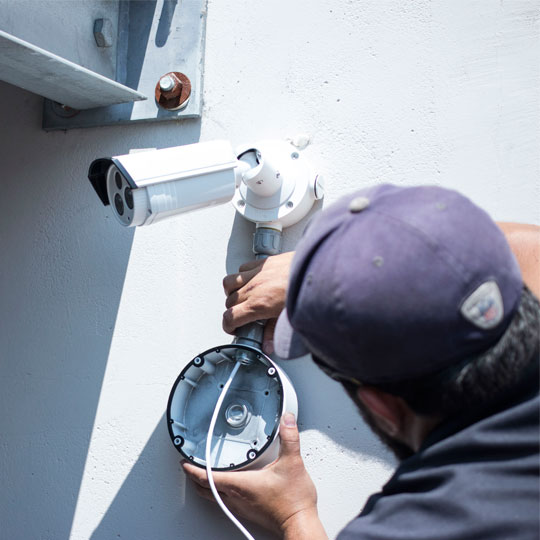
And here is what does not change. You still need the right camera in the right place at the right height. You still need cable run properly and a PoE switch with enough power budget. Cloud does not rescue a camera pointed at a bright window, and it does not make a 2-megapixel image identify anybody at ninety feet. The physical half of the job is identical.
The bandwidth question nobody asks until the bill arrives
This is the part that decides whether cloud managed security cameras are right for a site, and it is the part most quotes leave out.
Continuous cloud upload of every camera at full resolution is rarely practical outside a fibre-served building. A sixteen-camera system streaming everything can saturate a typical business connection during the working day, which is exactly when the rest of the business needs it. The workable designs are almost always one of these:
- Local recording with cloud management. Footage stays on site on a cloud managed video recorder or on the cameras themselves. The cloud handles the interface, user accounts, alerts and health monitoring, and you pull individual clips up on demand. Low bandwidth, full remote control.
- Event-only upload. Everything records locally; motion, line-crossing and analytic events push to the cloud immediately. You get instant off-site copies of the moments that matter without moving hundreds of gigabytes of empty parking lot.
- Full cloud upload. Genuinely useful when footage must survive the building — cash handling, remote or unstaffed sites, anywhere a burglar could walk out with the recorder. Needs the upload capacity to match, and we will tell you before installation whether your connection has it.
We measure your actual upload speed during the survey rather than trusting the number on the internet bill. It is a fifteen-minute check that prevents the most expensive kind of disappointment.
Cloud, on-premise or hybrid
Choose cloud (VSaaS)
Several sites under one login. No IT staff. Unstaffed or remote locations. Rented premises you may leave. A strong preference for a predictable monthly cost over a capital purchase.
Choose on-premise
Very high camera counts. Long retention measured in months. Limited or metered upload. A site where an existing recorder and cabling still have years of life in them.
Choose hybrid
The common answer. Local retention for bulk footage, cloud for access, alerting, user management and off-site copies of alarm events. Most of the benefit, a fraction of the bandwidth.
What VSaaS actually costs to run
Video surveillance as a service is priced per camera per month, and the retention period is the main lever. Expect roughly $10–$25 per camera per month for short retention with local storage and cloud management, and $25–$60 per camera per month for longer cloud retention at higher resolution. Licenses are usually annual, and multi-year terms carry a discount.
Two things are worth knowing before you sign anything. First, the subscription is not optional later — if it lapses, most platforms stop recording, so treat it as an operating cost rather than a trial. Second, check whether the license is tied to the camera or to your account, because that determines what happens when a camera is replaced under warranty. We will point out which model a given platform uses rather than letting you discover it in year three.
When we tell people not to buy cloud
If a site has a healthy recorder, decent cameras and no requirement for remote access, replacing it with a cloud subscription is spending money to solve a problem that is not there. If the upload connection is a rural DSL line, full cloud recording will disappoint no matter which brand is on the box. And if the real need is a person watching the screens at three in the morning, what is wanted is remote video monitoring — cloud storage on its own alerts nobody.
We install cloud based CCTV across North and South Carolina from offices in Charlotte and Columbia, and we are equally willing to tell you that your existing system is fine.
Authorized · Certified · Carolinas
Authorized dealer, certified installer and integrator — the Carolinas
360 Mobile Vision designs, installs and supports cloud-managed camera systems with no recorder on site for businesses throughout North and South Carolina. We are an authorized dealer for the manufacturers we fit, which is what separates a supported system from a box bought online with nobody to call.
- DealerGenuine equipment, correct licensing and a real manufacturer support path.
- InstallerOur own certified technicians survey, cable, mount, program and commission the system.
- IntegratorNew work joined to whatever is already installed — cameras, doors, network, identity.
- Still here afterwardsRepairs, maintenance, expansion and takeover of systems installed by others. Emergency support around the clock.
Related services, products and planning guides
Arcules
Use the Arcules guide to compare compatible equipment, integrations, deployment choices and lifecycle responsibilities related to this project.
Avigilon
Use the Avigilon guide to compare compatible equipment, integrations, deployment choices and lifecycle responsibilities related to this project.
Commercial
Use the Commercial guide to compare compatible equipment, integrations, deployment choices and lifecycle responsibilities related to this project.
Manufacturing
Use the Manufacturing guide to compare compatible equipment, integrations, deployment choices and lifecycle responsibilities related to this project.
Retail
Use the Retail guide to compare compatible equipment, integrations, deployment choices and lifecycle responsibilities related to this project.