
System planning guide
Verkada Workplace deserves a requirements-first comparison. This guide organizes the product choices around compatibility, daily administration, infrastructure dependencies and long-term support so a project team can make a defensible selection before equipment is purchased.
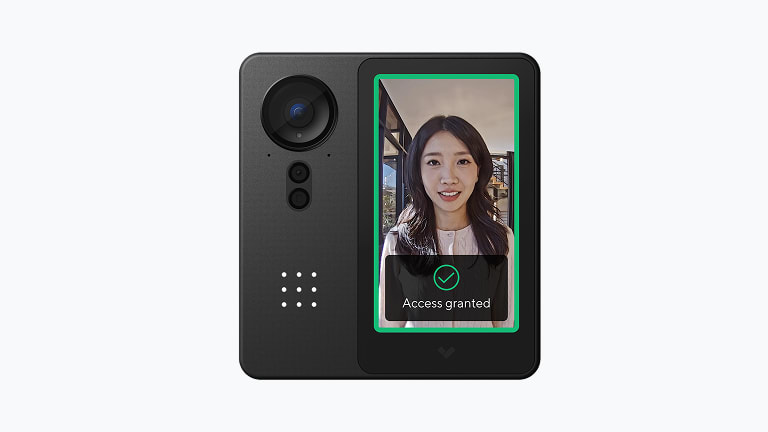
Product capabilities worth comparing
This family spans the subjects listed below. A design review should connect each selected function to a documented user, security or facility requirement.
- Certified Verkada Workplace Design, Installation and Support
- What a complete project can include
- On-site assessment and review of existing infrastructure
- System design, equipment selection and written project scope
- Cabling, mounting, termination, configuration and integration
- Device-by-device testing, labeling and project documentation
- Administrator orientation, user training and support planning
Decisions to document before procurement
Before a purchase order is issued, the scope needs to show how the architecture will work at this facility and who will own it after handoff. The following checks reveal gaps that feature comparisons often miss.
- Commission the complete workflow under normal, failure and recovery conditions.
- Provide training, configuration records, as-built information and a clear service plan at handoff.
- Define the operational problem, affected users, system boundaries and acceptance criteria before procurement.
- Inventory existing equipment, infrastructure, licenses, warranties and reusable components.
Planning for North and South Carolina facilities
Carolina projects can span urban office towers, distribution facilities, campuses and remote sites. The design should account for the building’s operating hours, local construction coordination, environmental exposure and the owner’s support model rather than assuming every location is identical.
Project administration is based at 6201 Fairview Rd, Charlotte, North Carolina 28210 - USA. North Carolina and South Carolina work is scheduled according to site count, system type, required trades and support expectations.
A practical delivery sequence
1. Discovery
Define objectives, users, existing assets, ownership and measurable acceptance criteria. The Verkada Workplace scope should identify the evidence produced at this stage.
2. Field review
Validate infrastructure, pathways, power, network, integrations, environment and work restrictions. The Verkada Workplace scope should identify the evidence produced at this stage.
3. Documented design
Select components only after assumptions, responsibilities, licensing and test criteria are written. The Verkada Workplace scope should identify the evidence produced at this stage.
4. Acceptance
Exercise normal operation, failures and recovery; then deliver training and system records. The Verkada Workplace scope should identify the evidence produced at this stage.
Lifecycle, updates and official resources
Record the installed model, hardware revision, software release and entitlement at handoff. Before an update, check intermediate versions, backups, maintenance windows and recovery options using official manufacturer documentation. 360 Mobile Vision links to those sources instead of storing firmware.
Current manuals, release notes, compatibility information and downloads should be obtained from the manufacturer’s official support portal for the selected product.
Build a site-specific scope
Share the site conditions, existing assets, user requirements and support expectations. We can turn that starting point into focused questions for a Verkada Workplace consultation.
Authorized · Certified · Carolinas
Authorized Verkada dealer, certified installer and integrator
360 Mobile Vision sells, installs, programs and services Verkada for businesses across North and South Carolina — cloud cameras with edge recording, door controllers, intercoms, alarms and environmental sensors. Being the authorized dealer as well as the installer is what gets you genuine equipment, a valid warranty and a manufacturer support path when something needs escalating.
- DealerWe quote and supply genuine Verkada equipment, licensing and subscriptions.
- InstallerOur own technicians run the cable, mount the hardware, set the software up and test it — not a subcontractor you have never met.
- IntegratorWe make it work with the cameras, doors, network and identity systems already in the building, rather than leaving you with two systems that do not talk.
- Still here afterwardsService, repair, expansion and takeover of systems somebody else installed. Emergency support around the clock.
Official Verkada software, firmware and support
Use the manufacturer links below for current software, firmware, release notes, manuals and technical resources. 360 Mobile Vision links directly to official manufacturer portals and does not copy or host firmware files.
Before installing an update: verify the exact model, region, hardware revision, current version, required intermediate releases, licensing or support entitlement, backup and rollback plan, integrations and maintenance window. An incorrect firmware package or upgrade sequence can interrupt service, invalidate compatibility or prevent a downgrade. Coordinate updates for monitored, life-safety-adjacent or business-critical systems with the system administrator and an authorized specialist.
Some resources require a customer, dealer, certified-technician or active-support login. Cloud-managed products may update automatically and may not provide a public firmware file.
Related services, products and planning guides
Retail
Use the Retail guide to compare compatible equipment, integrations, deployment choices and lifecycle responsibilities related to this project.
School
Use the School guide to compare compatible equipment, integrations, deployment choices and lifecycle responsibilities related to this project.
Verkada Access Control Installation, Repair, Dealer, Reseller and Maintenance
Use the Verkada Access Control Installation, Repair, Dealer, Reseller and Maintenance guide to compare compatible equipment, integrations, deployment choices and lifecycle responsibilities related to this project.
Verkada Alarms
Use the Verkada Alarms guide to compare compatible equipment, integrations, deployment choices and lifecycle responsibilities related to this project.
Verkada Environmental Sensors
Use the Verkada Environmental Sensors guide to compare compatible equipment, integrations, deployment choices and lifecycle responsibilities related to this project.