
Brivo software and credential guide
Compare the software, credential and guest workflows that people interact with every day. The right configuration depends on who administers access, how identities enter and leave the system, which phones and readers are supported, and how exceptions are handled.
Brivo Access administration
Brivo Access provides cloud administration for people, groups, credentials, schedules, doors, events and emergency actions. A design should define administrator roles, MFA and SSO requirements, the source of identity data, audit retention, remote-support rules and who approves policy changes. Multi-site organizations should also establish naming, schedule and permission standards so every location is not configured differently.
Users and groups
Define how employees, residents, vendors and temporary users are created, assigned and removed.
Schedules and doors
Document normal, holiday, exception and emergency behavior for each opening and group.
Events and response
Choose alerts, investigations, incident ownership and the evidence that must be retained.
Remote management
Establish approved devices, administrator authentication, support access and change logging.
Mobile Pass and Wallet credentials
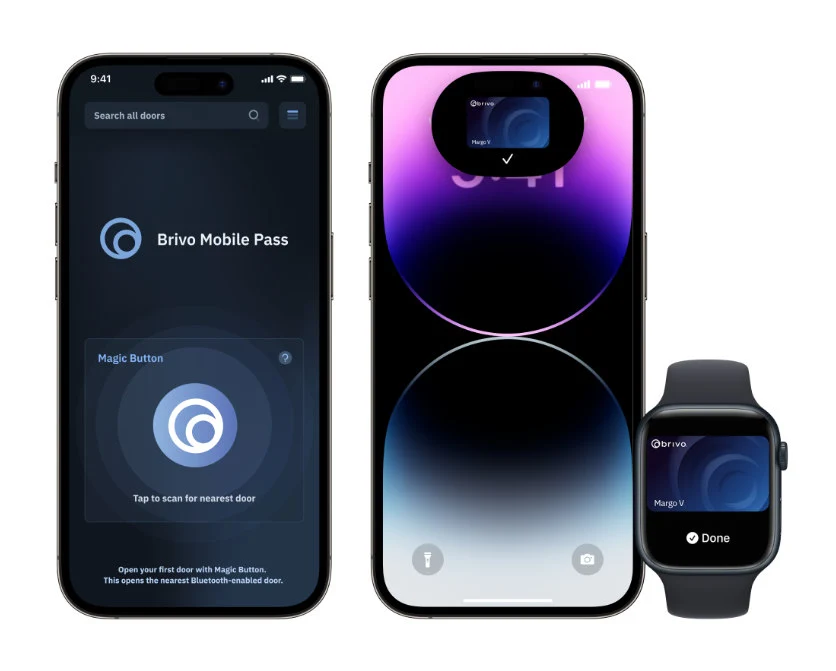
Brivo Mobile Pass can turn a supported phone into a credential, while supported Apple Wallet and Google Wallet options can provide tap-to-enter behavior on eligible devices. Before rollout, confirm reader compatibility, operating-system and regional availability, pass allocation, enrollment steps and whether users need internet, Bluetooth or NFC for the selected workflow.
- Set a policy for issuing, suspending and revoking mobile credentials.
- Define what happens when a user replaces, loses or shares a device.
- Keep a documented alternative for users without an eligible phone.
- Test interior, exterior, gate, elevator and low-connectivity use cases separately.
- Coordinate HR or identity integration so offboarding is not dependent on manual memory.
Visitor Management and Guest Management
Brivo currently describes Brivo Visitor Management as powered by Envoy, with kiosk-supported visitor, delivery, badge-printing and screening functions. Brivo Guest Management can preregister guests and issue time-limited PIN or Mobile Pass access. These workflows solve different needs and may carry different edition, device or subscription requirements.
Reception workflow
Decide whether visitors self-register, are preregistered, present identification, answer screening questions or receive a printed badge.
Host approval
Define notifications, approvals, no-response behavior and who can release a door remotely.
Temporary credentials
Limit guest access by door, date and time, and confirm automatic expiration and audit reporting.
Privacy and retention
Set a purpose, retention period and access policy for visitor identity, photos, agreements and event history.
Identity, SSO and lifecycle automation
Supported identity integrations can connect Brivo to Microsoft Entra ID, Okta or other systems so user status follows an approved source. The integration design must map fields, groups, exceptions, duplicate identities, service accounts and failure alerts. SSO for administrators is separate from automated credential lifecycle and should be tested separately.
For each connector, document the Brivo edition, license, API ownership, sync interval, error queue, offboarding expectation and recovery method. A successful demonstration is not complete until a failed or delayed sync is visible to the responsible team.
Multifamily and Brivo Smart Home considerations
Brivo’s multifamily offering can combine common-area access, unit credentials, guest workflows, supported property-management integrations and smart-apartment functions. A property design should separate resident, staff, vendor and emergency access; define unit-turn procedures; assign battery and device-service responsibility; and protect resident privacy.
Property-management integration does not eliminate reconciliation. The owner should define which system is authoritative, when a lease or staff change takes effect, how exceptions are approved and how access is restored if an integration is unavailable.
Questions to settle before licensing
- Which Brivo edition and add-on packs supply the required functions?
- How many administrators, Mobile Passes, kiosks and retained years are included?
- Which users require cards, fobs, PINs, mobile or Wallet credentials?
- Which readers, locks and phones are confirmed compatible?
- Who owns identity, visitor, privacy, renewal and support administration?
- What reports and emergency procedures must be demonstrated at acceptance?
Design the user and visitor workflow
Provide the user types, sites, reader models, phone population, identity platform, visitor process and property-management requirements so the correct Brivo edition and credential plan can be evaluated.
Authorized · Certified · Carolinas
Authorized Brivo dealer, certified installer and integrator
360 Mobile Vision sells, installs, programs and services Brivo for businesses across North and South Carolina — cloud access control, ACS panels, smart readers and Mobile Pass credentials. Being the authorized dealer as well as the installer is what gets you genuine equipment, a valid warranty and a manufacturer support path when something needs escalating.
- DealerWe quote and supply genuine Brivo equipment, licensing and subscriptions.
- InstallerOur own technicians run the cable, mount the hardware, set the software up and test it — not a subcontractor you have never met.
- IntegratorWe make it work with the cameras, doors, network and identity systems already in the building, rather than leaving you with two systems that do not talk.
- Still here afterwardsService, repair, expansion and takeover of systems somebody else installed. Emergency support around the clock.
Official Brivo software, firmware and support
Use the manufacturer links below for current software, firmware, release notes, manuals and technical resources. 360 Mobile Vision links directly to official manufacturer portals and does not copy or host firmware files.
Before installing an update: verify the exact model, region, hardware revision, current version, required intermediate releases, licensing or support entitlement, backup and rollback plan, integrations and maintenance window. An incorrect firmware package or upgrade sequence can interrupt service, invalidate compatibility or prevent a downgrade. Coordinate updates for monitored, life-safety-adjacent or business-critical systems with the system administrator and an authorized specialist.
Some resources require a customer, dealer, certified-technician or active-support login. Cloud-managed products may update automatically and may not provide a public firmware file.