
Kaba planning guide
The value of Kaba Simplex Mechanical Pushbutton Locks depends on how well it matches the facility, users and support plan. The sections below separate product-family facts from site-specific design decisions for commercial projects in North and South Carolina.
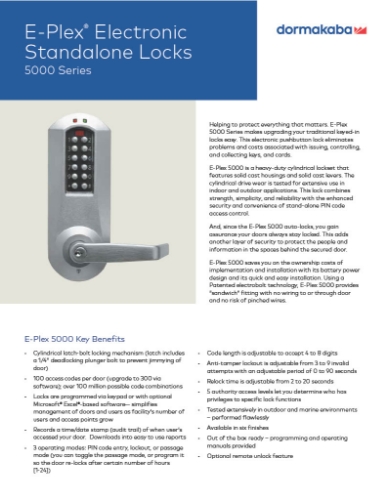
Product capabilities worth comparing
The strongest proposal will explain which of these capabilities is needed, which is optional and which is incompatible with the current environment.
- Product and selection guidance
- Simplex 1000/L1000/5000 and current family selection
- Cylindrical, mortise, exit and narrow-stile preparation
- Code control, override cylinder and user turnover
- No audit trail versus electronic access requirements
- Door preparation, life safety and accessibility
- Current availability, subscription and lifecycle support
- Administrator, credential and emergency override policy
- Training, documentation and preventive maintenance
- dormakaba electronic and pushbutton locks
- Simplex/E-Plex warranty
- Opening type, handing, frame and door condition
- Fire rating, egress, accessibility and code constraints
- Fail-safe or fail-secure operation and emergency release
- Credential, reader and controller compatibility
- Battery, wireless gateway and offline behavior
Decisions to document before procurement
Use these checkpoints to compare proposals on the same basis. Clear answers make lifecycle cost and implementation risk easier to evaluate.
- Document licensing, subscriptions, software versions, spare capacity and a supported migration path.
- Survey every controlled opening, frame, door hardware, free-egress requirement and accessibility condition.
- Confirm controller, reader, credential and lock compatibility, including offline operation and battery backup.
- Define who manages identities, schedules, visitors, mobile credentials and revoked access.
Planning for North and South Carolina facilities
For projects in the Carolinas, early coordination with property management, IT, the general contractor and other trades reduces redesign. Work windows, ceiling access, inspections, network readiness and owner-furnished responsibilities should be recorded before mobilization.
Carolina design and deployment coordination begins at 6201 Fairview Rd, Charlotte, North Carolina 28210 - USA. The proposal records travel, access, work windows and service responsibilities for each included location.
A practical delivery sequence
1. Problem definition
State the event or workflow the system must improve and how success will be measured. The Kaba Simplex Mechanical Pushbutton Locks scope should identify the evidence produced at this stage.
2. Option review
Compare reuse, migration and replacement using compatibility, lifecycle and implementation risk. The Kaba Simplex Mechanical Pushbutton Locks scope should identify the evidence produced at this stage.
3. Coordinated deployment
Sequence infrastructure, hardware, software and integrations with the owner and other trades. The Kaba Simplex Mechanical Pushbutton Locks scope should identify the evidence produced at this stage.
4. Closeout
Resolve punch items and provide credentials, backups, training, test results and support contacts. The Kaba Simplex Mechanical Pushbutton Locks scope should identify the evidence produced at this stage.
Lifecycle, updates and official resources
Record the installed model, hardware revision, software release and entitlement at handoff. Before an update, check intermediate versions, backups, maintenance windows and recovery options using official manufacturer documentation. 360 Mobile Vision links to those sources instead of storing firmware.
Build a site-specific scope
Share the site conditions, existing assets, user requirements and support expectations. We can turn that starting point into focused questions for a Kaba Simplex Mechanical Pushbutton Locks consultation.
Authorized · Certified · Carolinas
Authorized Kaba dealer, certified installer and integrator
360 Mobile Vision sells, installs, programs and services Kaba for businesses across North and South Carolina — Simplex mechanical pushbutton locks and E-Plex electronic locks. Being the authorized dealer as well as the installer is what gets you genuine equipment, a valid warranty and a manufacturer support path when something needs escalating.
- DealerWe quote and supply genuine Kaba equipment, licensing and subscriptions.
- InstallerOur own technicians run the cable, mount the hardware, set the software up and test it — not a subcontractor you have never met.
- IntegratorWe make it work with the cameras, doors, network and identity systems already in the building, rather than leaving you with two systems that do not talk.
- Still here afterwardsService, repair, expansion and takeover of systems somebody else installed. Emergency support around the clock.
Official Kaba / dormakaba software, firmware and support
Use the manufacturer links below for current software, firmware, release notes, manuals and technical resources. 360 Mobile Vision links directly to official manufacturer portals and does not copy or host firmware files.
Before installing an update: verify the exact model, region, hardware revision, current version, required intermediate releases, licensing or support entitlement, backup and rollback plan, integrations and maintenance window. An incorrect firmware package or upgrade sequence can interrupt service, invalidate compatibility or prevent a downgrade. Coordinate updates for monitored, life-safety-adjacent or business-critical systems with the system administrator and an authorized specialist.
Some resources require a customer, dealer, certified-technician or active-support login. Cloud-managed products may update automatically and may not provide a public firmware file.